> ## Documentation Index
> Fetch the complete documentation index at: https://docs.viberapi.com/llms.txt
> Use this file to discover all available pages before exploring further.
# 快速开始
> 三分钟开启你的AI之旅
### 步骤1 注册与登录
* 使用邮箱注册,接收验证码完成注册。注意妥善保存账户信息
使用上面注册的账户进行登录
### 步骤2 充值额度
进入 控制台 - 钱包管理,输入充值的金额,这里站点的汇率按照中转站主流的汇率模式,采用USD:CNY=1:1的模式,即充值1人民币等于1美金。比如图中输入50,实际支付50人民币,到账50美金。
目前仅支持Stripe支付,Stripe中使用任意信用卡即可进行充值。其他支付渠道陆续开通中。
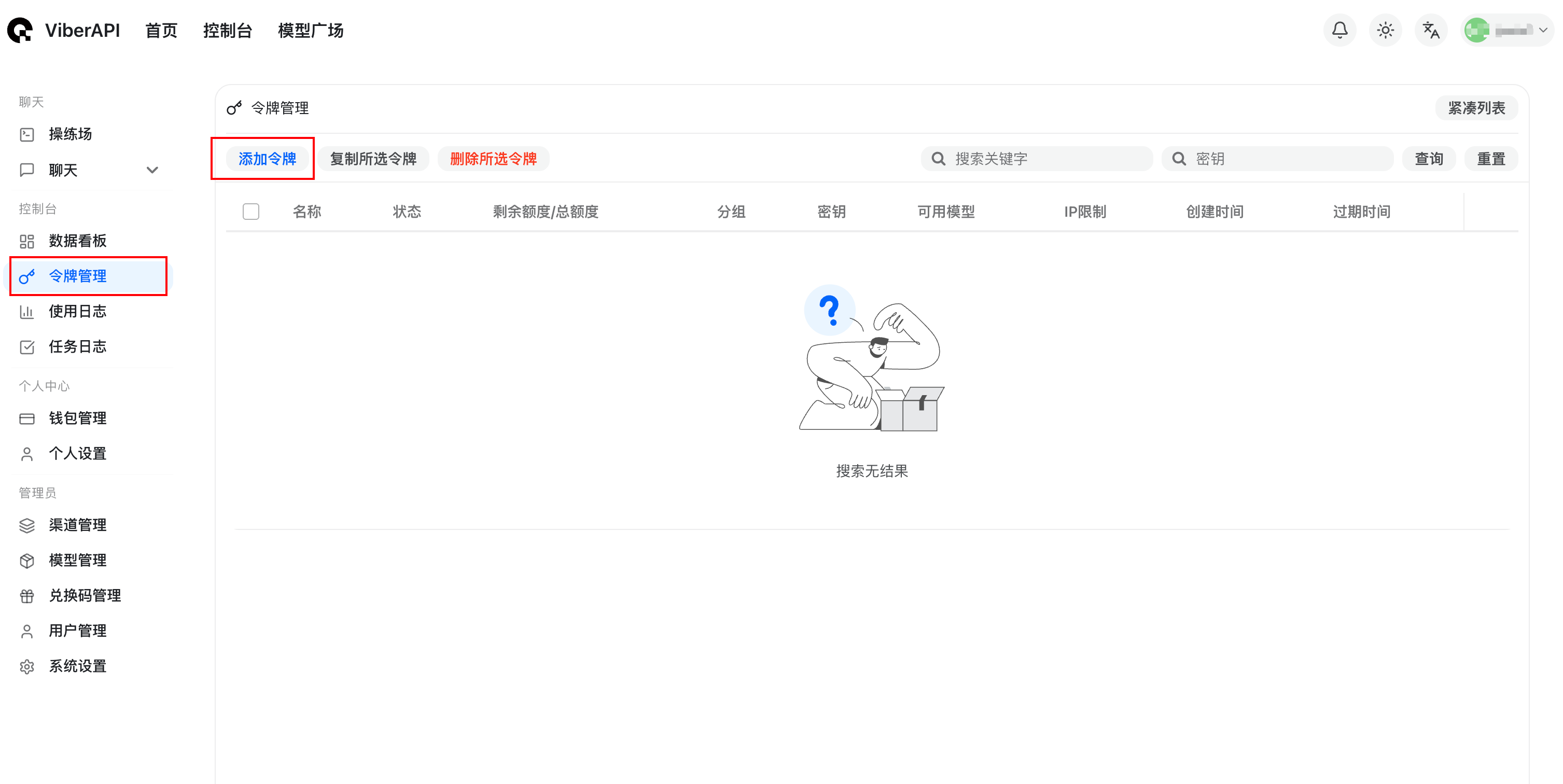 ### 步骤3 创建API Key
1. 进入控制台 -> 令牌管理 -> 添加令牌。按照默认的配置即可
2. 令牌的分组可以进行调整,这里的倍率代表消耗的速度,比如x1代表默认速率,x0.5 代表可以使用两倍的Token。我们会根据上游渠道的价格变化和供需情况动态调整倍率。
### 步骤4 开始Vibe之旅
以Claude Code为例,此时我们只需要编辑 \~/.claude/settings.json
```json theme={null}
{
"env": {
"ANTHROPIC_BASE_URL": "https://viberapi.com",
"ANTHROPIC_AUTH_TOKEN": "这里输入上一步创建的API Key即可"
}
}
```
## 接下来,你还可以了解
在拿到API Key之后,你可以根据自己喜欢的大模型进行调用,我们提供了一些关于分组倍率以及常见AI工具的安装教程,供您参考。
Learn MDX syntax and start writing your documentation.
Make your docs match your brand perfectly.
Include syntax-highlighted code blocks.
Auto-generate API docs from OpenAPI specs.
**Need help?** See our [full documentation](https://mintlify.com/docs) or join our [community](https://mintlify.com/community).
### 步骤3 创建API Key
1. 进入控制台 -> 令牌管理 -> 添加令牌。按照默认的配置即可
2. 令牌的分组可以进行调整,这里的倍率代表消耗的速度,比如x1代表默认速率,x0.5 代表可以使用两倍的Token。我们会根据上游渠道的价格变化和供需情况动态调整倍率。
### 步骤4 开始Vibe之旅
以Claude Code为例,此时我们只需要编辑 \~/.claude/settings.json
```json theme={null}
{
"env": {
"ANTHROPIC_BASE_URL": "https://viberapi.com",
"ANTHROPIC_AUTH_TOKEN": "这里输入上一步创建的API Key即可"
}
}
```
## 接下来,你还可以了解
在拿到API Key之后,你可以根据自己喜欢的大模型进行调用,我们提供了一些关于分组倍率以及常见AI工具的安装教程,供您参考。
Learn MDX syntax and start writing your documentation.
Make your docs match your brand perfectly.
Include syntax-highlighted code blocks.
Auto-generate API docs from OpenAPI specs.
**Need help?** See our [full documentation](https://mintlify.com/docs) or join our [community](https://mintlify.com/community).